AI is not a mind reader that can understand what’s going on in your head and instantly give you the perfect result. It works more like a collaboration—the quality of output depends on the quality of input you provide. The more clear, detailed, and structured your instructions are, the better results you’ll get. The same applies to AI video generators. When you balance clarity with context, you can create videos that actually perform well and stand out.
If you’ve been struggling with writing AI video prompts, you’re not alone. It’s a skill that improves with practice. In this guide, we’ll break down how to write effective prompts and also provide ready-to-use examples so you can start creating high-quality videos right away.
Why Prompts Matter in AI Video Creation
There’s one golden rule you should always remember: your input defines your output.
All AI video tools follow the same principle—if your prompt is vague, your result will be generic. For example, a prompt like “create a product demo video” will give you a basic output. But a more specific prompt like “create a 15-second testimonial-style video for a skincare product with upbeat music and a friendly tone” will generate a much more engaging and targeted result.
In simple terms, your prompt is not just an instruction, it’s a blueprint that guides the entire video creation process.
Best Practices for Writing AI Video Prompts
Writing strong prompts is a mix of clarity and creativity. Whether you’re using Tagshop AI or any other AI video tool, these practices will help you get better results.
1. Keep It Clear and Concise
Avoid overcomplicating your prompts. AI performs best when instructions are simple and direct.
❌ “Make a cool video for my product”
✅ “Create a 15-second product ad with upbeat music and a testimonial-style tone”
2. Define Tone, Style, Audience, and CTA
A high-quality prompt should always include these four elements:
- Tone: casual, professional, energetic
- Style: testimonial, tutorial, explainer
- Audience: Gen Z, professionals, parents
- CTA: shop now, sign up, learn more
These factors guide how the AI structures the script, visuals, and delivery.
3. Optimize for Each Platform
Every platform has a different content style and audience behavior:
- TikTok → fast-paced, trendy, short
- Instagram Reels → visually engaging, bold
- YouTube Shorts → slightly informative
- LinkedIn → professional and polished
Customizing your prompts based on the platform helps create content that feels native and performs better.
The Perfect Prompt Formula
Use this simple structure to create powerful prompts:
[Objective] + [Format] + [Audience/Style] + [Key Elements] + [Platform] + [CTA]
This ensures your AI tool clearly understands what to create, how to present it, and what outcome you expect.
Ready-to-Use AI Video Prompt Examples
Here are some practical prompts you can start using immediately:
1. Product Promo Prompt
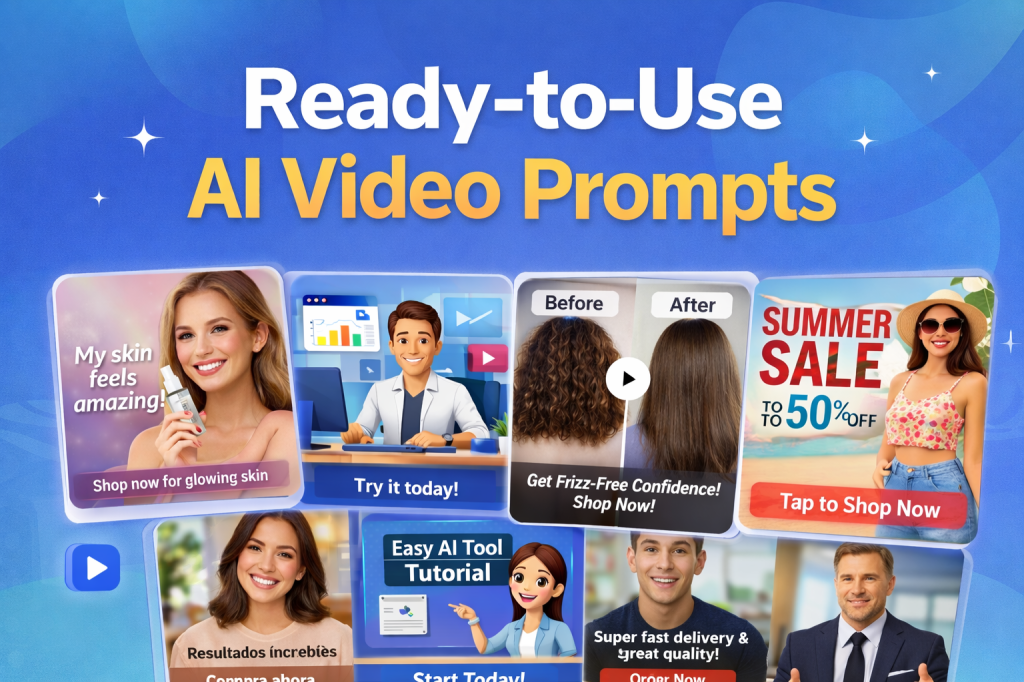
Create a 15-second testimonial-style video for a skincare product using a female avatar. Highlight real results, soft visuals, and upbeat background music. End with a CTA: “Shop now for glowing skin.”
2. Explainer Video Prompt
Create a simple explainer video showing how an AI tool helps marketers create high-converting ads. Use a friendly avatar, step-by-step visuals, and keep the language simple. End with: “Try it today.”
3. eCommerce Video Prompt
Create a before-and-after style video showcasing the transformation from using a haircare product. Start with the problem, then show results. Use close-up shots, upbeat music, and end with: “Shop now.”
4. Social Media Ad Prompt
Create a 30-second Instagram Reel for a fashion sale. Use fast cuts, bold text overlays, and energetic music. Highlight discounts and end with: “Tap to shop now.”
5. Multilingual Video Prompt
Convert a product video into Spanish with accurate lip-sync and subtitles. Maintain tone and visuals. End with: “Compra ahora.”
6. Educational Video Prompt
Create a beginner-friendly tutorial explaining how to use an AI tool. Include step-by-step visuals, captions, and clear instructions. End with: “Start today.”
7. Testimonial Video Prompt
Create a 30-second customer testimonial highlighting product quality and fast delivery. Use a casual tone and include a CTA: “Order now.”
8. Corporate Video Prompt
Create a CEO-style announcement video summarizing company growth and future goals. Use a professional tone and end with a motivational message.
How to Customize and Scale These Prompts
You can easily scale your video creation process by:
- Adjusting tone, language, and avatar type
- Using tools like Tagshop AI for bulk creation or URL-to-video workflows
- Repurposing one prompt across multiple platforms (Reels, Shorts, ads, etc.)
Final Thoughts
We’re living in a time where AI video tools are accessible to everyone. The real difference comes from how well you write your prompts. The better your input, the better your output.
With platforms like Tagshop AI, creating videos has become faster and easier than ever. All you need is a well-structured prompt, and you can generate high-quality videos in minutes.
 AI Avatar Tech Blog
Leave a comment