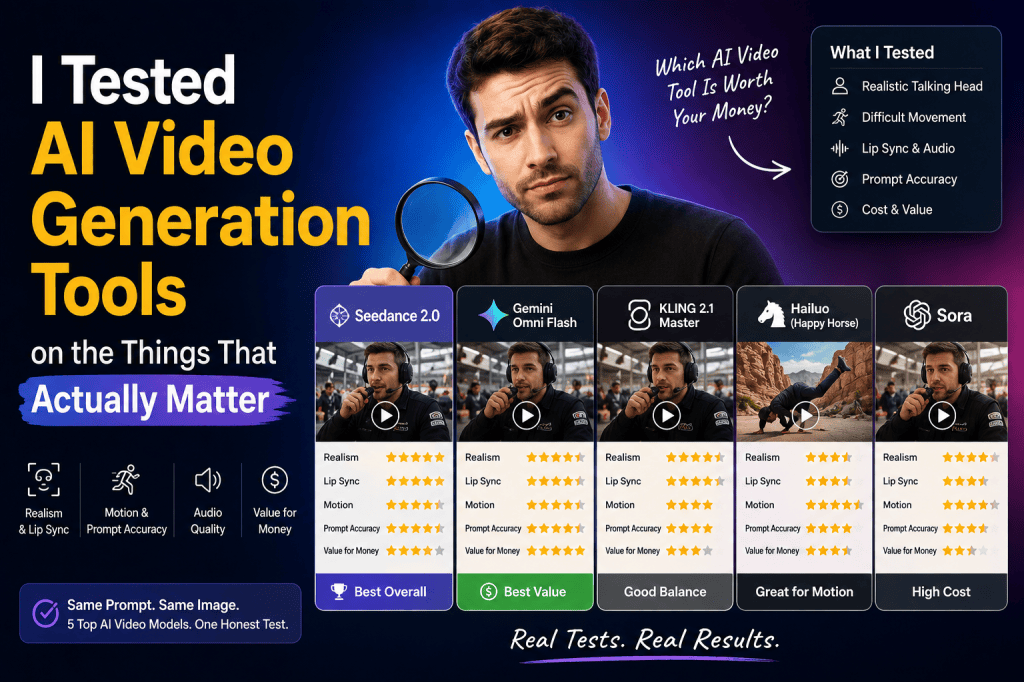
Discover what really matters when comparing AI video generation tools, from realistic avatars and lip sync to motion, audio, creative control, and cost.
AI video generation has moved far beyond simple text-to-video experiments.
Today, marketers can generate talking presenters, product demonstrations, cinematic scenes, social media videos, and UGC-style advertisements with AI. But having access to powerful models does not automatically mean you’ll get a usable marketing video.
The real question is:
Which AI video generation tools actually perform well on the things that matter?
A recent comparison workflow tested five major AI video models using the same prompts, starting image, and settings. The tests focused on two very different challenges: creating a realistic person talking directly to the camera and generating difficult fast-paced movement. The results showed something important: there is no single AI video model that is perfect at everything.
Some models performed strongly with realistic faces and lip sync. Others were better at following complex prompts or handling movement. Cost also changed the picture significantly because the most impressive output was not necessarily the most economical one.
That lesson is especially important for brands creating UGC video ads.
And when I looked at how these requirements translate into a practical marketing workflow, I found that Tagshop AI brings many of these capabilities together in one AI video and UGC workflow, including AI avatars, scripts, voiceovers, lip sync, product videos, multiple AI video models, templates, and platform-ready formats.
So instead of judging an AI video generator only by how impressive one demo looks, let’s look at what actually matters.
Why Testing AI Video Generation Tools the Same Way Matters
Comparing AI video generators can be misleading.
One platform might show a cinematic demo created with a carefully selected prompt. Another might show a realistic AI avatar. A third might focus on product animation.
Those examples can make every platform look impressive.
But marketers don’t usually need one impressive demo.
They need to create repeatable videos for campaigns.
That’s why a fair comparison should control as many variables as possible:
- Same prompt
- Same starting image
- Similar output settings
- Similar video duration
- Similar creative objective
- Similar evaluation criteria
The transcript’s testing approach followed this principle by using the same prompt and starting image across the models, changing primarily the model being tested.
This is a useful approach for anyone evaluating an AI video generator.
Instead of asking, “Which tool looks best in a demo?” ask:
“Which tool produces the best result for the type of video I actually need?”
Test 1: Can AI Create a Realistic Talking Person?
The first challenge is one of the most important for UGC video.
A person looks directly at the camera and speaks naturally.
That sounds simple, but it requires several AI systems to work together:
- Facial realism
- Mouth movement
- Lip synchronization
- Voice generation
- Facial expressions
- Head movement
- Timing
- Background consistency
The transcript specifically describes this as a difficult test because realistic talking-head videos require the AI to coordinate the person’s appearance and speech convincingly.
For UGC ads, this matters enormously.
A viewer may forgive a slightly artificial background.
They are much less likely to ignore a mouth that clearly doesn’t match the words.
Lip Sync Is More Important Than It Looks
Lip sync can make or break an AI UGC video.
If the voice says one thing while the mouth appears to say something else, the viewer immediately notices.
In the test, one of the strongest models produced highly realistic facial movement and accurate lip sync, while another generated a convincing face but struggled when the character started speaking.
This reveals an important distinction.
Realistic image generation is not the same as realistic video generation.
A model can generate a beautiful still image and still struggle to animate that person naturally.
For brands, this means you should evaluate the complete performance rather than looking only at the avatar preview.
Tagshop AI specifically focuses on AI UGC videos with AI avatars, realistic voiceovers, and natural-looking delivery. Its current AI Video Agent workflow can generate a script, select an avatar, add voiceover, and produce the final video as part of one workflow.
What I Found in Tagshop AI for UGC Video Creation
This is where the comparison becomes especially relevant for marketers.
The transcript is fundamentally about discovering which AI video models perform best at different tasks. Tagshop AI approaches the problem from a more marketing-focused perspective by bringing video generation, avatars, scripts, voices, product assets, and UGC ad creation into one platform.
The current Tagshop AI workflow allows you to start with a product URL, product image, or a simple description of what you want to create. The AI Video Agent then asks questions about the audience, tone, platform, and creative direction before generating the video.
That changes the workflow from:
Prompt → video
to:
Product → campaign idea → creative direction → script → avatar → voice → scenes → finished UGC ad
For marketers, that can be much more useful.
Test 2: How Well Does an AI Model Handle Difficult Movement?
The second test in the transcript moved in the opposite direction.
Instead of a person standing relatively still and talking, the challenge involved a breakdancer performing fast movements in a canyon environment.
The prompt also included a specific camera movement, a sequence of tricks, and a music cue.
This type of test is useful because AI video generation often becomes harder when several things need to happen simultaneously.
The AI must understand:
- Character movement
- Body position
- Camera movement
- Environment
- Timing
- Scene continuity
- Audio
- Prompt instructions
A model may look excellent in a simple shot but struggle when the scene becomes more complicated.
Prompt Adherence Matters for Marketing
Prompt adherence is another underrated feature.
Imagine you ask an AI model to create:
A creator holding a skincare product, showing it to the camera, applying it, then explaining three benefits while the camera slowly moves closer.
If the AI creates a beautiful video but skips the product demonstration, the result isn’t necessarily useful.
Marketing videos are not just about aesthetics.
They need to communicate specific information.
The transcript’s motion test showed this clearly. Some models attempted most of the requested actions, while others ignored major elements such as the specified camera movement.
For UGC advertising, strong prompt adherence can mean the difference between a creative that looks good and one that actually communicates the selling point.
The Cheapest Model Wasn’t Necessarily the Worst
One of the most interesting findings from the comparison was the relationship between quality and cost.
The tested models required different numbers of credits. According to the transcript, Gemini Omni Flash used 30 credits per generation, compared with 90 for Kling, 68 for Happy Horse, 153 for Sora, and 330 for Seedance in the tested setup.
The cheapest model also performed surprisingly well in several tests.
This leads to a valuable lesson:
The most expensive AI video model isn’t automatically the best choice for every campaign.
If you’re producing a single hero video where maximum quality matters, a premium model may make sense.
But if you’re creating hundreds of variations for testing, production economics become much more important.
Quality vs. Scale: The Real AI Video Decision
Imagine you’re running a paid social campaign.
You could create:
- 1 premium video
- 5 hooks
- 3 presenters
- 4 product angles
- 3 CTAs
Suddenly, you have dozens of possible creative combinations.
At that point, production cost matters.
This is why an effective AI UGC video generator needs to be evaluated not only on output quality but also on how efficiently it supports creative iteration.
Tagshop AI is designed around this type of workflow, with UGC templates, AI avatars, product-focused videos, and multiple AI video models available within the platform.
Why Multiple AI Models Can Be Better Than One
One of the biggest lessons from the transcript is that different models have different strengths.
The testing found one model performing strongly across realistic talking-head and motion tests, while another cheaper model offered strong value and prompt adherence. Other models performed well in certain areas but struggled in others.
That suggests an important strategy:
Don’t force one model to do every job.
For example:
| Video Requirement | What to Prioritize |
| UGC talking head | Realistic avatar + lip sync |
| Product demonstration | Product consistency + motion |
| Cinematic product scene | Visual quality + camera control |
| Testimonial | Voice + facial performance |
| Fast creative testing | Speed + generation cost |
| Complex scene | Prompt adherence + motion |
| Social ad | Hook + pacing + captions |
| Localization | Voice + language support |
Tagshop AI currently offers multiple AI video models, including Seedance, Kling, Veo, Wan, and Gemini models, giving marketers the ability to approach different creative requirements from one platform.
UGC Videos Need More Than AI Avatars
A common mistake is to think that an AI UGC video is simply:
Avatar + script = UGC
It isn’t.
Good UGC-style advertising depends on the entire creative structure.
A strong video usually needs:
A Strong Hook
The first few seconds need to create enough curiosity for the viewer to continue watching.
A Relatable Problem
The viewer should recognize the problem or desire being discussed.
A Product Introduction
The product should enter naturally into the story.
A Clear Benefit
Instead of simply listing features, explain what changes for the customer.
Visual Proof
Show the product, demonstration, result, or relevant footage.
A Natural CTA
End with a clear next action without making the video feel like a traditional commercial.
This is why Tagshop AI’s UGC workflow includes scripts, avatars, voiceovers, scenes, captions, and B-roll rather than focusing only on avatar generation.
Product Integration Is a Major Advantage
For eCommerce brands, the product needs to remain central.
A beautiful AI presenter isn’t useful if the product looks distorted or disconnected from the scene.
Tagshop AI supports workflows where brands can provide product URLs or images and generate product-focused videos. Its platform also includes product-avatar functionality and asset-generation tools designed for UGC-style advertising.
This can be particularly useful for:
- Beauty products
- Fashion
- Consumer electronics
- Food and beverages
- Fitness products
- Home products
- SaaS products
- Mobile apps
Instead of starting every video from an empty timeline, marketers can start from the actual product.
Localization Makes AI UGC More Scalable
Another important consideration is language.
Traditional UGC campaigns can become complicated when you need different creators for different markets.
Tagshop AI currently supports 75+ languages across script, voiceover, and on-screen text workflows, according to its AI Video Agent documentation.
This can make localization significantly easier.
A brand could develop one campaign concept and adapt it for different audiences by changing:
- Language
- Voice
- Presenter
- Messaging
- CTA
- Cultural context
That makes AI UGC particularly useful for brands operating across multiple markets.
Don’t Forget Creative Variations
The biggest advantage of AI video generation may not be making one video.
It may be making many versions of the same idea.
For example, one product campaign could have:
| Creative Variable | Example Variations |
| Hook | Curiosity, problem, benefit |
| Presenter | Different creators |
| Tone | Funny, emotional, educational |
| Product benefit | Price, quality, convenience |
| Video style | Review, demo, testimonial |
| CTA | Shop now, learn more, try it |
| Language | English, Hindi, Spanish |
| Length | Short, medium, extended |
Instead of investing heavily in one polished advertisement, marketers can use AI to build a broader creative testing system.
That’s where a UGC-focused platform becomes more useful than a generic video generator.
What the Test Really Teaches Us
After looking at the transcript’s results, I think the biggest takeaway is not that one model won.
The bigger lesson is that AI video generation is task-dependent.
The model that produces the best talking head may not be the best at fast movement.
The model with the highest quality may not have the best cost efficiency.
The cheapest model may be surprisingly effective for experimentation.
And the most important capability for a filmmaker may be different from what a performance marketer needs.
The transcript reaches a similar conclusion: different models have different strengths and weaknesses, and users may need different tools depending on what they are creating.
Why I Would Use Tagshop AI for This Workflow
If your goal is specifically AI UGC video creation, the advantage of Tagshop AI is that you don’t have to think about video generation as an isolated task.
You can start with a product and work toward a complete advertisement.
The platform combines:
- AI Video Agent
- AI avatars
- AI scripts
- Voiceovers
- Lip sync
- Product videos
- UGC templates
- B-roll
- Captions
- Multiple AI video models
- AI product assets
- Platform-ready exports
- Multi-language creation
These capabilities are currently documented across Tagshop AI’s UGC, AI Video Agent, and AI Video Generator products.
So, while the original test was designed to compare individual models, I found that many of the same things I would want to evaluate—realistic presenters, lip sync, audio, motion, model choice, product integration, and creative scalability—are available within Tagshop AI’s broader workflow.
How to Test Tagshop AI Yourself
If you want to evaluate an AI UGC video generator fairly, don’t just create one random video.
Use a small test framework.
Test 1: Talking Head
Create a 20–30 second product recommendation.
Evaluate:
- Facial realism
- Voice
- Lip sync
- Expression
- Natural delivery
Test 2: Product Demonstration
Ask the AI presenter to show the product and explain one specific feature.
Evaluate product consistency and scene quality.
Test 3: Multiple Hooks
Generate three versions of the same ad with different opening lines.
Compare which one feels most engaging.
Test 4: Different Presenters
Use different AI avatars and compare which one best matches your target audience.
Test 5: Localization
Create the same concept in multiple languages.
Evaluate voice quality, pronunciation, and overall naturalness.
Test 6: Creative Volume
Try producing multiple variations from the same campaign brief.
This tells you whether the platform can actually support your long-term workflow.
Frequently Asked Questions
What is an AI video generation tool?
An AI video generation tool uses artificial intelligence to create or modify videos from inputs such as text prompts, images, product information, scripts, or reference videos. Depending on the platform, it may generate scenes, presenters, voiceovers, animations, captions, and complete videos.
What should I look for in an AI video generator?
Look beyond visual quality. Evaluate realism, lip sync, voice quality, prompt adherence, motion, product consistency, editing, generation speed, cost, available models, and the ability to create multiple variations.
What is an AI UGC video generator?
An AI UGC video generator creates videos designed to resemble creator-style or user-generated content. These may include AI presenters, conversational scripts, product demonstrations, testimonials, reviews, and social-first formats.
Can Tagshop AI create UGC videos?
Yes. Tagshop AI is specifically positioned around AI UGC video creation. Its workflow can generate scripts, AI avatars, voiceovers, scenes, captions, and B-roll from a product idea, URL, image, or prompt.
Does Tagshop AI support different AI video models?
Yes. Tagshop AI currently lists multiple AI video models, including Seedance, Kling, Veo, Wan, and Gemini models.
Can I create videos with AI avatars?
Yes. Tagshop AI currently offers a library of 300+ AI avatars through its AI Video Agent and related video-generation workflows.
Can AI UGC videos be used for advertising?
AI-generated UGC-style videos can be used for marketing and advertising, subject to the applicable advertising platform rules and truthfulness requirements. Brands should avoid presenting fictional AI-generated experiences as genuine customer testimonials when that could mislead viewers.
Is the most expensive AI video model always the best?
No. The transcript’s comparison demonstrated that the most expensive model was not automatically the best value. A cheaper model performed strongly in several tests, showing why cost, quality, and intended use should be evaluated together.
Final Verdict
The biggest lesson from testing AI video generation tools is simple:
Don’t choose an AI video generator based on one impressive demo.
Test it against the things you actually need.
If you’re creating UGC ads, evaluate the quality of the presenter, voice, lip sync, product integration, script, hook, captions, and overall authenticity.
If you’re creating cinematic videos, evaluate motion, camera control, scene consistency, and visual quality.
If you’re running paid advertising at scale, add another metric to the list:
How many usable creative variations can I produce for the budget?
That’s where the AI video landscape gets interesting.
The transcript comparison showed that different models can have dramatically different strengths. One model may dominate realistic talking-head generation, while another may offer better cost efficiency. Another may handle certain visual tasks better but struggle with movement or prompt adherence.
For marketers, the best solution is therefore not always about finding a single “best” model.
It’s about finding a workflow that gives you the capabilities you need.
And for AI UGC video creation, I found that Tagshop AI brings many of those requirements into one platform—from product input and AI scripting to avatars, voiceovers, lip sync, scenes, captions, B-roll, multiple AI models, and ready-to-use UGC ads.
If your goal is to move from product idea → UGC concept → AI video → creative variations → publishable ad, that workflow is ultimately more important than simply choosing the model with the highest score in a single benchmark.
 AI Avatar Tech Blog
Leave a comment