Creating high-quality videos with AI is becoming easier, faster, and more accessible for marketers, creators, and businesses. Instead of spending hours writing scripts, recording footage, hiring actors, or learning complicated video editing software, creators can now use AI video generation tools to turn simple ideas into engaging video content.
One of the latest AI video models gaining attention is Kling 4.0. When combined with a platform such as Tagshop AI, users can access AI-powered video creation through a simple workflow without having to manage a complicated technical setup.
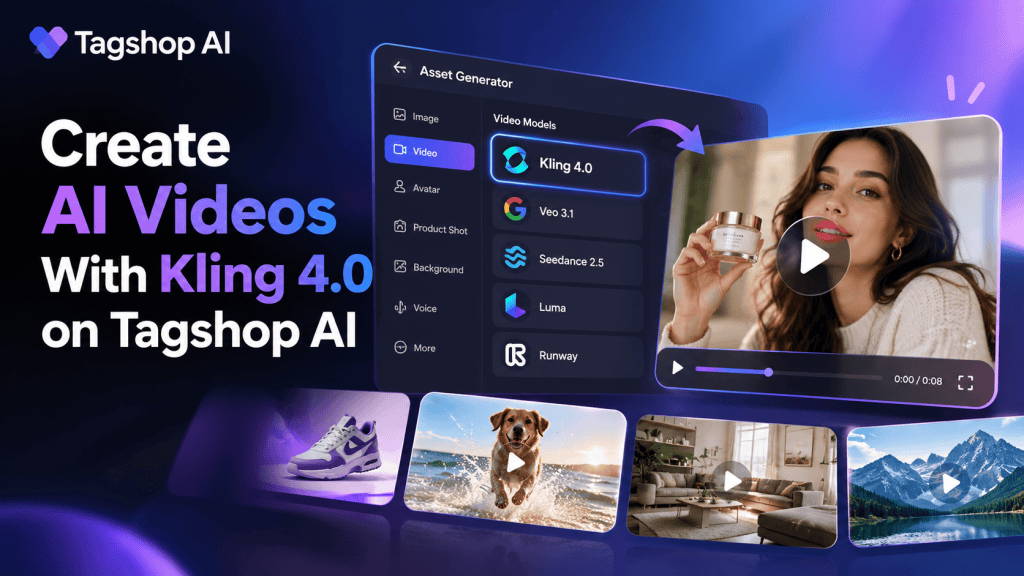
With Tagshop AI, you can log in, open the Asset Generator, select Kling 4.0 from the available video models, provide your creative input, and generate an AI video.
In this guide, we will explain how to create AI videos with Kling 4.0 on Tagshop AI, how the workflow works, and why AI video generation can be useful for marketers, ecommerce brands, social media creators, and businesses.
What Is Kling 4.0?
Kling 4.0 is an AI video generation model designed to help users create video content from creative instructions. Instead of manually producing every element of a video, an AI video model can interpret your input and generate visual content based on the direction you provide.
The basic concept is simple: you provide an idea or prompt describing what you want to see, and the AI model processes that information to generate a video.
For example, you could describe a product being showcased in a modern studio, a person demonstrating a product, a cinematic scene, or a social-media-style visual.
The quality of the final output depends heavily on the prompt, assets, creative direction, and settings you provide.
This makes Kling 4.0 useful for people who want to experiment with different video concepts without starting every project from traditional video production.
Why Create AI Videos With Kling 4.0?
Traditional video production can require cameras, lighting, actors, locations, editing software, and significant production time. AI video generation can simplify many of these steps.
Using Kling 4.0 on Tagshop AI, creators can experiment with video concepts directly from an AI-powered workflow.
Some potential benefits include:
Faster Video Production
One of the biggest advantages of AI video creation is speed. Instead of producing every scene manually, you can start with an idea and use an AI model to generate the visual content.
This can be especially useful when you need multiple creative variations for social media or advertising campaigns.
More Creative Experiments
AI video generation allows marketers to test different visual concepts quickly. You can experiment with different scenes, product presentations, environments, and creative directions.
This can help teams discover which concepts are worth developing further.
Useful for Marketing Content
Brands constantly need new visual content for platforms such as Instagram, TikTok, YouTube, and advertising campaigns.
An AI video generator can help teams create additional creative assets without making every video from scratch.
Easier Content Creation
You do not necessarily need advanced video production skills to begin experimenting with AI-generated videos. A simple prompt and the right creative direction can be enough to get started.
How to Create AI Videos With Kling 4.0 on Tagshop AI
Creating a video with Kling 4.0 through Tagshop AI follows a straightforward process.
Here is the basic workflow:
Tagshop AI → Login → Asset Generator → Select Kling 4.0 → Add Your Creative Input → Generate Video
Let’s look at each step in detail.
Step 1: Log In to Tagshop AI
The first step is to open Tagshop AI and log in to your account.
After logging in, you will access the platform’s video creation environment, where you can explore the available AI-powered tools and generation features.
If you are new to Tagshop AI, you can create an account and explore the available features before starting your video project.
The goal at this stage is simply to reach the main workspace where you can access the available asset and video generation tools.
Step 2: Go to Asset Generator
Once you are inside Tagshop AI, navigate to the Asset Generator.
The Asset Generator is where you can explore different AI-powered generation options and available models.
Instead of manually searching for separate AI video software, you can use the available models directly inside the Tagshop AI workflow.
This makes the process more convenient when you are already using Tagshop AI for marketing assets or AI-generated content.
Step 3: Explore the Available Video Models
After opening the Asset Generator, you will find multiple video model options.
This is an important part of the workflow because different AI models can be suitable for different creative requirements.
Look through the available video models and find Kling 4.0.
Select Kling 4.0 to use it for your video generation workflow.
Having multiple models available in one platform can make it easier to experiment with different generation approaches instead of moving between multiple AI tools.
Step 4: Select Kling 4.0
Once you find Kling 4.0, select the model.
Now you are ready to provide the creative direction for your video.
Before generating your video, think about what you want the final result to look like.
For example, instead of writing a generic prompt such as:
“Create a product video.”
You could provide more context:
“Create a modern product showcase video featuring a skincare product on a clean bathroom counter, soft natural lighting, premium lifestyle aesthetic, smooth camera movement, and a visually appealing commercial style.”
A detailed prompt gives the AI more information about the scene you want to create.
Step 5: Write a Detailed Video Prompt
Your prompt is one of the most important parts of the AI video generation process.
A good prompt should clearly communicate the subject, environment, action, visual style, and camera direction.
You can structure your prompt around these elements:
Subject: What should appear in the video?
Action: What is happening?
Environment: Where does the scene take place?
Style: Should the video look cinematic, realistic, minimal, lifestyle-focused, or promotional?
Camera: What type of camera movement or framing do you want?
Lighting: What lighting should be used?
For example:
“Create a realistic ecommerce product video showing a premium perfume bottle placed on a luxury marble table. Use warm studio lighting, subtle reflections, elegant camera movement, close-up product shots, and a premium commercial aesthetic.”
The more clearly you describe your creative idea, the easier it is to communicate your intended result to the AI video model.
Step 6: Generate Your AI Video
After entering your prompt and selecting Kling 4.0, start the video generation process.
The AI model will process your instructions and generate the video based on the creative direction you provided.
Depending on your requirements, you may need to experiment with different prompts to get the desired result.
AI video creation is often an iterative process. Your first generation may give you a useful starting point, while subsequent prompts can help you improve the concept.
Instead of trying to create the perfect video immediately, think of each generation as part of the creative process.
Step 7: Review the Generated Video
Once the video is generated, review it carefully.
Look at the overall visual quality and check whether the video matches your original idea.
Pay attention to:
- Subject appearance
- Product presentation
- Scene composition
- Camera movement
- Lighting
- Visual consistency
- Overall realism
- Brand suitability
If something does not look right, modify your prompt and generate another version.
For example, if your product does not receive enough attention, you can make the prompt more product-focused.
If the scene looks too cinematic for an ecommerce advertisement, you can request a more natural and commercial style.
Step 8: Create Multiple Creative Variations
One of the most useful applications of an AI video generator is creative testing.
Instead of creating one video and using it everywhere, you can experiment with multiple concepts.
For example, an ecommerce brand could create:
- A product-focused video
- A lifestyle video
- A problem-solution video
- A cinematic product commercial
- A social-media-style video
These variations can help marketers explore different creative directions.
For paid advertising, having multiple creative concepts can also make it easier to test different hooks and visual approaches.
Tips for Better Kling 4.0 AI Videos
Getting good results from AI video generation is not only about selecting the right model. Your creative instructions also matter.
Be Specific
Avoid vague prompts whenever possible.
Instead of saying “make a beautiful product video,” describe the product, environment, lighting, camera movement, and desired visual style.
Describe the Action
Tell the model what should happen in the scene.
For example:
“Show the product rotating slowly while the camera moves from a wide shot into a close-up.”
This provides more visual direction than simply mentioning the product.
Keep the Concept Focused
Trying to put too many ideas into one video can make the prompt unnecessarily complicated.
Focus on one primary visual concept and build from there.
Think About Your Audience
A video created for a luxury fashion brand may need a different visual style from a video created for a casual TikTok campaign.
Always consider where the video will be used and who will watch it.
Experiment With Prompts
Your first generation does not have to be your final version.
Try different descriptions, camera directions, environments, and visual styles to discover what works best for your campaign.
Who Can Use Kling 4.0 on Tagshop AI?
The workflow can be useful for a wide range of users.
Ecommerce brands can use AI-generated videos to showcase products and create additional marketing creatives.
Digital marketers can experiment with different video concepts for campaigns.
Social media managers can create visual content for social platforms.
Content creators can explore AI-generated scenes without traditional production equipment.
Advertising teams can create multiple creative concepts for testing.
SaaS companies can also use AI-generated visuals to create promotional content, product demonstrations, and campaign assets.
Kling 4.0 vs Traditional Video Creation
Traditional video production gives creators extensive control, but it can also require more resources. Production may involve planning, filming, actors, locations, equipment, editing, and post-production.
AI video generation provides a different approach.
With a workflow such as Tagshop AI + Kling 4.0, creators can start with a concept and use AI to generate visual content from their instructions.
This does not mean AI completely replaces traditional production in every situation. Instead, it gives marketers and creators another way to produce and test visual ideas.
For short-form marketing content, concept testing, product creatives, and social media experiments, this workflow can be particularly useful.
Why Tagshop AI Makes the Workflow Convenient
The biggest advantage of using Tagshop AI is having AI-powered creative tools within one environment.
Instead of managing different platforms for every stage of content creation, users can access available generation capabilities through Tagshop AI.
The Asset Generator also gives users access to multiple models, making it easier to choose a model based on the type of creative they want to produce.
For users interested in Kling 4.0 AI video generation, the workflow is straightforward:
Log in → Open Asset Generator → Select Kling 4.0 → Write your prompt → Generate → Review → Improve → Create variations.
This simple process can reduce the friction involved in experimenting with AI-generated video content.
Final Thoughts
AI video generation is changing how creators and marketers approach visual content production. Instead of relying entirely on traditional production workflows, teams can use AI models to quickly explore new ideas and create additional creative assets.
With Kling 4.0 on Tagshop AI, the process is simple. Log in to Tagshop AI, open the Asset Generator, explore the available video models, select Kling 4.0, enter your creative instructions, and generate your video.
The key to getting better results is not simply selecting a powerful AI video model. Your prompt, creative direction, subject, environment, camera instructions, and intended audience all influence the final concept.
If you are experimenting with AI video creation, start with a simple idea, generate a version, review the result, and refine your prompt. With repeated experimentation, you can create a library of AI-generated video concepts for ecommerce, social media, advertising, and other marketing campaigns.
Tagshop AI makes this workflow accessible by bringing AI video generation and multiple creative models into one platform, giving marketers and creators a practical way to turn ideas into video content.


Leave a Reply