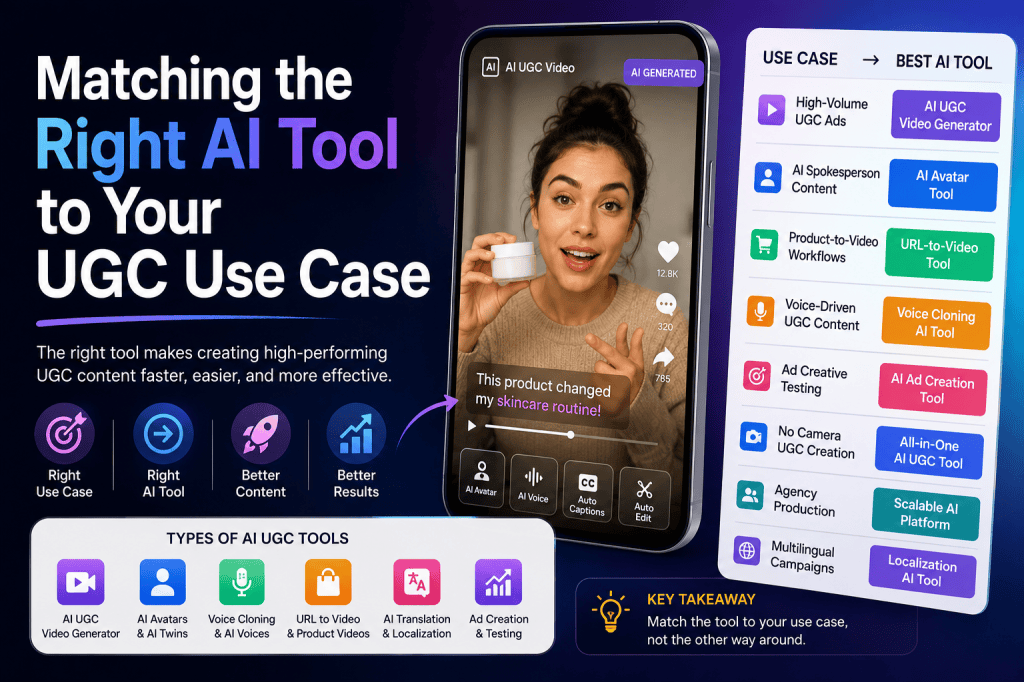
AI-generated user-generated content has quickly become one of the most practical ways for brands to scale creative production. Instead of depending entirely on creators, studios, cameras, and editors, marketers can now use AI to generate UGC-style videos, product demonstrations, testimonials, voiceovers, avatars, and social ads in a fraction of the traditional production time.
But there is one problem: not every AI UGC tool is built for the same job.
Some platforms are designed primarily for AI avatars. Others focus on UGC video generation, product-to-video workflows, voice cloning, ad creation, or creative testing. Choosing the wrong platform can mean paying for features you don’t need—or discovering that your chosen tool doesn’t support the workflow your team actually needs.
That’s why the right approach isn’t simply to find the “best AI UGC tool.”
Instead, you should ask:
What exactly do I want to create, and which AI UGC tool is best suited to that use case?
Whether you’re creating TikTok ads, Meta creatives, product videos, creator-style testimonials, localized campaigns, or high-volume performance ads, matching the tool to the job can make your AI content workflow significantly more efficient.
What Is an AI UGC Tool?
An AI UGC tool is software that uses artificial intelligence to help brands create content that resembles traditional user-generated content without requiring a traditional creator-production workflow.
Depending on the platform, an AI UGC tool may offer features such as:
- AI-generated UGC videos
- AI avatars
- AI voices
- Voice cloning
- Script generation
- Product-to-video creation
- Product demonstrations
- AI presenters
- Social media ad templates
- Automatic captions
- Video resizing
- Creative variations
- Multiple languages
- AI twins or digital replicas
The goal is not necessarily to replace real creators completely. Instead, AI can make it easier to produce more creative variations, test ideas faster, and reduce the operational workload involved in producing social content.
If you’re still getting familiar with the category, this guide on what AI UGC is and why DTC brands are talking about it provides useful background.
Why Choosing the Right AI UGC Tool Matters
Imagine you’re a DTC brand launching a new skincare product.
You might need:
- A 15-second TikTok ad
- A product demonstration
- Three different hooks
- Five different UGC presenters
- A voiceover
- Product close-ups
- Versions in English and Spanish
- Multiple creatives for Meta testing
One AI platform may handle most of this workflow from a product URL.
Another may be excellent at creating realistic digital presenters but require you to manually build the rest of the video.
Another may specialize in voice cloning.
Another may focus on turning existing winning ads into new variations.
All of these can be excellent AI UGC tools—but for different use cases.
The best choice therefore depends on your creative objective, production volume, audience, budget, and level of control.
1. For High-Volume UGC Ads: Choose an AI UGC Video Generator
If your main goal is to produce lots of UGC-style advertisements, start with a dedicated AI UGC video generator.
This is particularly useful for performance marketing teams that constantly need fresh creative.
Instead of producing one video every few weeks, you can create multiple variations around:
- Different hooks
- Different customer pain points
- Different avatars
- Different CTAs
- Different product benefits
- Different video lengths
- Different audiences
This approach turns AI into a creative testing engine rather than simply a video production tool.
For example, you could create one concept around price, another around convenience, and another around a specific customer problem. You can then use campaign data to identify which creative direction deserves more investment.
If you’re interested in the paid-ad side of AI UGC, this guide covers whether AI-generated UGC can actually be used as paid ads.
Best for
An AI UGC video generator is particularly suitable for:
- DTC brands
- E-commerce stores
- Performance marketers
- Advertising agencies
- Social media teams
- Product launches
- Creative testing
What to look for
When choosing a platform, look for:
Multiple avatars: More presenter options make it easier to match different audiences.
Script generation: Useful when your team needs help developing hooks and messaging.
Product integration: URL-to-video workflows can significantly reduce production time.
Creative variations: The ability to generate several versions is critical for paid advertising.
Social formats: Make sure the platform supports vertical formats for TikTok, Instagram Reels, and similar placements.
2. For AI Avatar Presenters: Choose an Avatar-Focused AI UGC Tool
Sometimes you don’t need an entire UGC production platform.
You simply need a realistic AI person who can deliver your script.
This is where avatar-focused AI tools are useful.
AI avatars can present:
- Product explanations
- Tutorials
- Advertisements
- Educational content
- Product announcements
- Social videos
- Explainer videos
The advantage is consistency. Instead of finding a new creator for every video, you can use a consistent AI presenter across a campaign.
However, avatar selection matters.
A luxury skincare brand, gaming company, financial app, and fitness product may all require completely different presenter styles.
You should consider:
- Age
- Appearance
- Presentation style
- Voice
- Accent
- Clothing
- Background
- Target audience
AI Avatar vs. AI Twin
AI avatars and AI twins are often discussed together, but they aren’t exactly the same.
An AI avatar is generally a synthetic digital presenter created or selected from an AI platform.
An AI twin is designed to replicate a particular person’s appearance and potentially their voice or mannerisms.
That difference matters when you’re deciding how much personalization your campaign requires.
If you want to understand the distinction better, check out this comparison of AI avatars vs. AI twins.
Best for
Avatar-focused AI UGC tools work well for:
- Founder-led brands
- SaaS companies
- Educational businesses
- Personal brands
- Product explainers
- Consistent spokesperson campaigns
3. For Product-to-Video Content: Choose a URL-to-Video AI Tool
One of the most useful AI UGC workflows for e-commerce brands is product URL to video.
Instead of starting with a blank editor, you provide a product page.
The AI can use information from the page—such as product descriptions, imagery, benefits, and other available product details—to help create a video concept.
This can dramatically shorten the distance between:
Product page → Video ad
For e-commerce businesses with dozens or hundreds of products, this is especially valuable.
Imagine launching a new product every week.
Creating custom UGC videos manually for every SKU would quickly become expensive and difficult to manage.
A URL-to-video AI workflow gives marketers a way to turn existing product information into creative starting points much faster.
Best for
This type of AI UGC tool is ideal for:
- Shopify stores
- DTC brands
- Large product catalogs
- Seasonal campaigns
- New product launches
- E-commerce agencies
4. For Voice-Driven UGC: Choose an AI Tool With Voice Cloning
The voice can be just as important as the visuals in UGC advertising.
A video may look realistic, but if the voice sounds robotic or doesn’t match the presenter, the viewer can immediately notice the artificial nature of the content.
Voice cloning can help create a more consistent audio identity.
Depending on the platform and permissions involved, voice cloning can be used to create a consistent voice for:
- Brand presenters
- Founder content
- Campaign series
- Product explainers
- Localized content
- Social advertisements
However, voice cloning should always be used responsibly. You need appropriate authorization to clone or reproduce someone’s voice.
Several platforms now offer voice-focused AI UGC workflows. You can explore this review of AI UGC platforms with real voice cloning to understand what these tools offer.
Best for
Choose a voice-enabled AI UGC tool when:
- Voice consistency matters
- You produce many videos
- You want multilingual campaigns
- Your brand has a recognizable spokesperson
- You need fast voiceover production
5. For Ad Creative Testing: Choose an AI Advertising Tool
If you’re a performance marketer, producing a video isn’t the end goal.
Performance is.
That means the ideal AI UGC tool should help you create multiple creative directions rather than just one polished video.
For example, suppose you’re advertising a supplement.
You might test:
Hook 1: “Here’s what I wish I knew before buying supplements.”
Hook 2: “If you’re constantly feeling tired, here’s something to consider.”
Hook 3: “Three things I look for before choosing a supplement.”
Hook 4: “This is why I stopped buying random supplements.”
The product remains the same, but the messaging changes.
This is exactly where AI can provide an advantage.
A good AI UGC tool lets you produce creative variations quickly enough that your marketing team can spend more time analyzing results and less time coordinating production.
If you’re comparing different UGC platforms, this AI UGC advertising tool comparison can help you understand how different platforms approach AI-generated advertising.
6. For Creating UGC Without a Camera: Choose an All-in-One AI UGC Tool
Not every brand has access to creators, cameras, studios, or professional editors.
For smaller teams, an all-in-one AI UGC tool can simplify the entire process.
Ideally, you want a platform where you can:
- Provide the product.
- Generate a script.
- Select an avatar.
- Choose a voice.
- Generate the video.
- Add product visuals.
- Create different versions.
- Export the final creative.
This eliminates the need to move between several different platforms.
For marketers who want to experiment before investing in production, this guide explains how to create your first AI UGC ad without spending anything.
Another useful resource covers how to create an AI UGC ad without a creator or camera.
7. For Agencies: Prioritize Scalability
Agencies have a different problem.
Instead of creating content for one brand, they may need to create content for ten, twenty, or even hundreds of clients.
That makes scalability one of the most important factors when choosing an AI UGC tool.
An agency-friendly platform should ideally provide:
- Multiple avatar options
- Multiple languages
- Fast rendering
- Bulk generation
- Reusable templates
- Brand customization
- Multiple export formats
- Easy creative iteration
An agency should also consider how easy it is to manage different clients and campaigns.
A tool that saves 20 minutes per video can create significant savings when the agency is producing hundreds of videos every month.
8. For Multilingual Campaigns: Choose an AI UGC Tool With Localization
Global brands often face a simple problem:
One creative doesn’t necessarily work for every market.
The script may need to change.
The voice may need to change.
The presenter may need to change.
The cultural references may need to change.
AI makes this process considerably easier.
A strong AI UGC tool can help marketers create different versions of the same campaign in multiple languages.
For example:
English → Spanish → French → German → Hindi
Instead of organizing separate production with creators in every market, marketers can build localized versions digitally.
However, translation alone isn’t enough.
Good localization should also consider:
- Natural pronunciation
- Local expressions
- Cultural context
- Audience expectations
- Currency
- Product availability
- CTA language
9. For Authenticity: Don’t Automatically Choose the Most Realistic AI
This sounds counterintuitive, but realism isn’t everything.
The most photorealistic avatar isn’t necessarily the best UGC presenter.
UGC works because it feels relatable.
A slightly informal presenter with natural delivery may perform better than an extremely polished digital spokesperson.
When selecting an AI UGC tool, evaluate:
Does the video feel natural?
Does the script sound conversational?
Does the presenter fit the target audience?
Does the content look native to the platform?
Does the product remain central to the story?
These questions are more useful than simply asking whether the AI avatar looks real.
Tagshop AI: An All-in-One Option for AI UGC
For marketers looking for a broader AI UGC workflow, Tagshop AI is worth considering.
Rather than focusing on only one part of production, Tagshop AI brings several UGC and advertising capabilities together.
Its workflow includes features such as:
- AI UGC video generation
- AI avatars
- AI Video Agent
- URL-to-video creation
- AI voice capabilities
- Product-focused video generation
- Social advertising creatives
- Multiple creative variations
The AI Video Agent is particularly useful for marketers who don’t want to manually configure every part of the production process.
Instead of navigating through multiple settings, you can describe the type of video you want and provide your requirements. The agent can then help turn the brief into a finished creative concept.
This is useful when your goal isn’t simply to make one video, but to build a repeatable creative production workflow.
How to Choose the Right AI UGC Tool
If you’re still unsure which AI UGC tool to use, start with these five questions.
1. What are you trying to create?
Do you need:
- UGC ads?
- Product videos?
- Avatar presentations?
- Voiceovers?
- Testimonials?
- Social videos?
- Product demos?
Choose a tool based on the primary output.
2. How many videos do you need?
If you’re creating one video per month, a simple tool may be enough.
If you’re creating dozens or hundreds of videos, prioritize scalability and automation.
3. Do you need creators or avatars?
If authenticity is your priority, creator-based workflows may be useful.
If speed and consistency matter more, AI avatars can be more practical.
4. Do you need localization?
If you’re running international campaigns, prioritize multiple languages, voices, accents, and localization capabilities.
5. Do you need an entire workflow?
If you’re currently using five different tools for scripts, avatars, voiceovers, editing, and product visuals, an all-in-one AI UGC platform could reduce complexity.
AI UGC Tool Comparison by Use Case
| UGC Use Case | Ideal AI Tool Type | What to Prioritize |
| High-volume UGC ads | AI UGC video generator | Variations and speed |
| AI spokesperson | Avatar generator | Realism and presentation |
| Product videos | URL-to-video tool | Product understanding |
| Voice-driven content | Voice AI tool | Natural voice quality |
| Paid ad testing | AI ad generator | Creative variations |
| No-camera content | All-in-one AI UGC tool | Automation |
| Agency production | Scalable AI platform | Bulk generation |
| Global campaigns | Localization-focused AI tool | Languages and voices |
| Founder content | AI twin/voice tool | Consistency and likeness |
The Biggest Mistake: Choosing a Tool Before Defining the Use Case
The biggest mistake brands make is searching for the “best AI UGC tool” before deciding what they actually need.
Think about it like choosing a camera.
A professional filmmaker may need a completely different camera from someone creating TikTok videos.
The same applies to AI.
An agency producing hundreds of Meta ads needs different functionality from a founder creating one LinkedIn video every week.
That’s why your workflow should come first.
Start with:
Goal → Content type → Audience → Volume → Features → Tool
Not:
Tool → Features → Try to find a use case
Final Thoughts
The AI UGC market is expanding quickly, but there isn’t one universal AI UGC tool that is perfect for every brand.
The right platform depends on what you’re trying to accomplish.
If your goal is high-volume paid advertising, prioritize an AI UGC video generator with strong variation and testing capabilities.
If you’re building spokesperson content, look for realistic AI avatars.
If you’re an e-commerce brand, URL-to-video functionality can save significant production time.
If your campaigns depend on recognizable voices, prioritize voice generation and authorized voice cloning.
If you’re an agency, scalability and bulk creation should be high on your list.
And if you want to bring multiple steps together, an all-in-one platform such as Tagshop AI can simplify the workflow.
Ultimately, the best AI UGC tool isn’t necessarily the one with the longest feature list.
It’s the one that fits your production workflow, audience, creative strategy, and business goals.
AI UGC is becoming less about generating a single impressive video and more about building a repeatable system for creating, testing, learning, and scaling creative.
Choose the use case first. Then choose the AI tool.


Leave a comment