Creating professional videos traditionally requires a camera, presenter, script, lighting, recording equipment, editing software, and considerable production time. Artificial intelligence is changing that workflow by allowing creators and businesses to turn written text into videos featuring realistic talking avatars.
With an AI talking avatar video generator, users can provide a script or simple text, choose an AI avatar and voice, and generate a video in minutes. This technology is becoming increasingly useful for marketing, education, product demonstrations, social media, training, and customer communication.
But how does AI actually turn text into a talking avatar video? What technologies are involved, and what makes the final avatar appear to speak naturally?
In this guide, we’ll explain how AI turns text into talking avatar videos, the technology behind the process, how to create one step by step, common use cases, benefits, limitations, and best practices for creating more engaging AI avatar videos.
What Is a Talking Avatar Video?
A talking avatar video is a video in which a digital character or virtual presenter appears to speak a written script.
Instead of recording a real person saying every line, an AI system can generate the presenter’s speech, facial expressions, lip movements, and sometimes body gestures automatically.
Talking avatars can be designed to look realistic, stylized, animated, or completely fictional. Depending on the platform, users may be able to select from a library of pre-built avatars or create a customized digital character.
For example, a company could provide the following text:
“Welcome to our platform. In this video, we’ll show you how to create your first campaign.”
The AI system processes the text, generates a voice reading the script, synchronizes the avatar’s mouth with the generated speech, and produces a complete video.
This eliminates much of the traditional recording process.
How AI Turns Text Into Talking Avatar Videos
The process combines several AI technologies rather than relying on a single system.
A typical workflow includes:
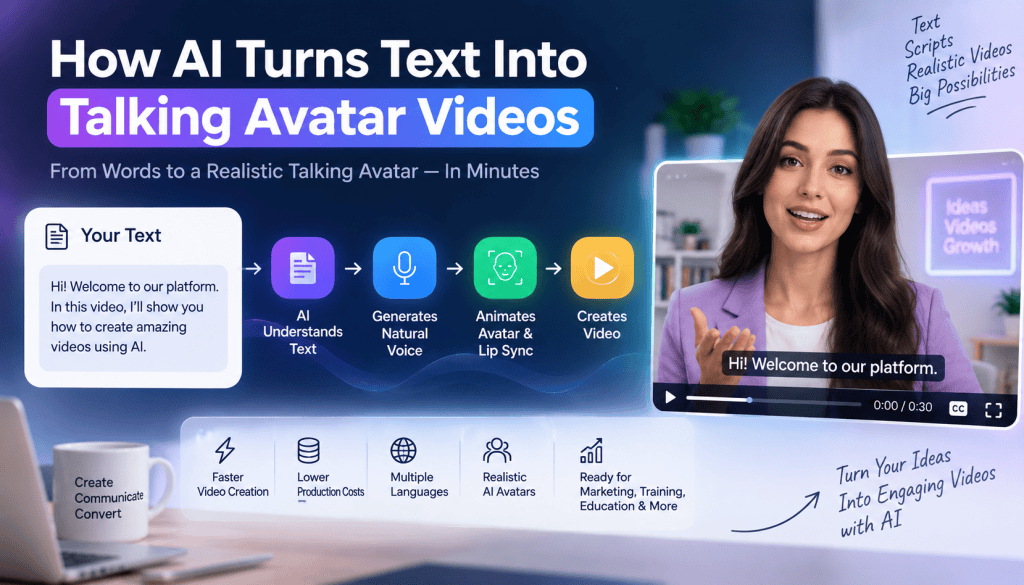
Text → Script Analysis → AI Voice → Facial Animation → Lip Synchronization → Video Rendering
Each stage plays an important role in producing the final video.
1. AI Understands the Written Script
The process starts when a user enters text into an AI video platform.
The system analyzes the text to determine words, sentences, punctuation, and sometimes the emotional tone of the content.
For example, punctuation can help the AI determine where the speaker should pause.
A question may require a different vocal pattern than a normal statement. Similarly, an exclamation mark can influence emphasis.
Some advanced systems can also help users rewrite or improve the script before generating the video.
This is particularly useful when the original text is too long, repetitive, or written in a style that doesn’t sound natural when spoken.
2. Text-to-Speech Generates the Voice
The next step is converting written text into spoken audio.
This is handled through text-to-speech (TTS) technology.
Modern AI voice systems can generate speech with different voices, accents, languages, speeds, and tones. Some systems can produce voices that include natural pauses and changes in emphasis.
For example, the same script might be generated using:
- A professional business voice
- A friendly conversational voice
- An energetic marketing voice
- An educational narrator
- Different regional accents
- Multiple languages
The quality of the voice has a major impact on how realistic the final avatar feels.
Older computer-generated voices often sounded robotic because they produced speech with limited variation. Modern neural speech models can create much more natural-sounding audio.
3. AI Selects or Creates the Avatar
After the voice is generated, the system needs a visual presenter.
Many AI avatar platforms provide pre-built avatar libraries. Users can select an avatar based on appearance, clothing, age, presentation style, and other characteristics.
Some platforms also support custom avatars.
A custom avatar can be created from images or recorded video, depending on the technology and platform. This allows businesses to develop branded virtual presenters or digital versions of authorized individuals.
The avatar provides the visual layer for the generated speech.
4. AI Generates Lip Movements
One of the most important parts of an AI talking avatar is lip synchronization, commonly called lip sync.
The AI analyzes the generated speech and determines how the avatar’s mouth should move while speaking.
Different sounds require different mouth shapes.
For example, sounds involving the lips, teeth, tongue, and jaw create different visual patterns. AI models can map these speech patterns to corresponding facial movements.
The goal is to synchronize the avatar’s mouth movements with the audio closely enough that the viewer perceives the avatar as naturally speaking.
Better lip synchronization can significantly improve realism.
5. Facial Expressions Are Added
Simply moving the mouth is not enough to create a convincing talking avatar.
Human communication involves facial expressions, eye movements, head movements, and other subtle behaviors.
Advanced AI avatar systems can generate facial expressions based on the script, voice, or predefined presentation style.
An avatar might:
- Smile during a positive statement
- Raise its eyebrows during a question
- Move its head while explaining something
- Change facial expressions during different sections
- Blink naturally
- Use subtle gestures
These small movements can make the video feel more dynamic.
However, excessive movement can have the opposite effect and make the avatar appear unnatural. Good avatar generation generally depends on balanced and appropriate motion.
6. AI Synchronizes Audio and Video
Once the speech, avatar animation, facial expressions, and lip movements have been generated, the system combines them into a synchronized video.
The audio determines the timing of the presentation.
The avatar’s mouth and facial movements are aligned with that timing, while additional elements such as backgrounds, text overlays, graphics, and product images can be added.
The result is a complete talking avatar video that can be exported for websites, presentations, social media, advertisements, training, or other purposes.
How to Create a Talking Avatar Video With AI
Creating an AI avatar video doesn’t require advanced video-production skills.
Step 1: Prepare Your Script
Start with a clear script.
Write as though someone will actually speak the words instead of writing a formal article.
For example, instead of:
“Organizations can leverage our innovative solution to optimize their marketing operations.”
A more natural version could be:
“Want to make your marketing workflow easier? Here’s how our platform can help.”
Short sentences are generally easier for an avatar to deliver naturally.
Step 2: Choose an AI Avatar
Select an avatar that matches your audience and content.
A corporate training video might require a professional-looking presenter, while a social media campaign could benefit from a more casual presentation style.
The avatar should support the message rather than distract from it.
Step 3: Select an AI Voice
Choose a voice that matches your brand and audience.
Pay attention to:
- Tone
- Pronunciation
- Speaking speed
- Accent
- Gender presentation
- Language
- Emotional style
For international campaigns, multilingual AI voices can make it easier to create localized versions of the same video.
Step 4: Generate the Video
Enter your script, select your avatar and voice, and generate the video.
Depending on the platform and complexity, the AI may take only a short time to create the initial version.
Review the output carefully before publishing.
Step 5: Edit and Customize
AI-generated videos can usually be improved with additional visual elements.
You can add:
- Brand colors
- Logos
- Captions
- Product images
- Screen recordings
- Backgrounds
- Headlines
- Call-to-action buttons
- Supporting graphics
For marketing videos, these elements can help explain the product while the avatar handles the spoken presentation.
Use Cases for AI Talking Avatar Videos
AI avatar videos are useful across many industries.
Marketing and Advertising
Marketers can create product explainers, promotional videos, social media advertisements, and campaign variations without recording a presenter for every version.
For example, a brand could generate several versions of an advertisement with different scripts, languages, and presenters.
Social Media Content
Short-form content can be created for platforms such as TikTok, Instagram Reels, Facebook, and YouTube Shorts.
AI avatars can introduce products, explain concepts, answer common questions, or deliver educational content.
Online Education
Educational companies can turn lessons, explanations, and course material into presenter-led videos.
This can make large amounts of written educational content easier to consume.
Employee Training
Businesses can create onboarding videos, internal training, policy explanations, and instructional content using AI presenters.
Updating the content can also be easier because a new script can be generated without organizing another filming session.
Product Demonstrations
Companies can combine an AI presenter with screen recordings or product visuals.
For example, a software company could use an AI avatar to explain a feature while the screen shows the actual interface.
Multilingual Content
One of the major advantages of AI video technology is localization.
A company can potentially use the same core script to create versions in different languages, helping it communicate with audiences across different markets.
Benefits of AI Talking Avatar Videos
Faster Video Production
Traditional filming requires scheduling, recording, editing, and revisions.
AI avatar technology can significantly shorten this workflow.
Lower Production Requirements
Businesses don’t necessarily need a camera setup, studio, lighting equipment, or presenter for every video.
Easy Content Updates
If information changes, the script can be updated and a new video can be generated.
This is especially useful for product tutorials, software training, and frequently changing information.
Scalable Content Creation
AI makes it easier to produce multiple video variations.
A company can create different versions for different audiences, products, languages, and platforms.
Consistent Presentation
A digital presenter can maintain a consistent visual identity across a large content library.
Common Challenges With AI Avatar Videos
Although AI avatar technology has improved significantly, it still has limitations.
Some avatars can occasionally display unnatural facial movements, awkward gestures, pronunciation problems, or unusual expressions.
Voice generation can also struggle with certain names, technical terminology, or uncommon words.
Another challenge is authenticity.
Viewers may recognize that an avatar is AI-generated, particularly when the content uses excessive animation or unnatural delivery.
For marketing content, businesses should also avoid presenting fictional AI-generated people as genuine customers or falsely implying that an avatar personally used or experienced a product.
Best Practices for Creating Better AI Avatar Videos
Keep Scripts Conversational
Write for the ear, not just the eye.
Read your script aloud before generating the video. If it sounds awkward when spoken, rewrite it.
Use Short Sentences
Short sentences make AI narration easier to follow.
They also create natural opportunities for pauses.
Match the Avatar to the Audience
The visual identity of the presenter should make sense for the content and target audience.
Use Supporting Visuals
Don’t make every video simply an avatar talking to the camera.
Use product demonstrations, screenshots, graphics, animations, and relevant footage to maintain viewer interest.
Add Captions
Captions can make videos easier to understand when viewers watch without sound.
They can also reinforce important information.
Review Every AI-Generated Video
AI generation is not the same as automatic quality assurance.
Check pronunciation, timing, facial expressions, factual claims, captions, and visual accuracy before publishing.
The Future of AI Talking Avatar Videos
AI avatar technology is moving toward increasingly realistic digital presenters, more expressive voices, better lip synchronization, and improved multilingual capabilities.
Future systems may also combine avatars with real-time conversational AI. Instead of following only a predefined script, virtual presenters could potentially respond dynamically to user questions.
For businesses, this could create new possibilities for interactive education, customer support, sales demonstrations, and personalized content.
At the same time, responsible use will remain important. Audiences should not be deliberately misled about whether they are interacting with a real person or AI-generated presenter when that distinction matters.
Final Thoughts
AI has changed the traditional video-production workflow by making it possible to transform written text into complete talking avatar videos.
The process combines text-to-speech technology, AI avatars, facial animation, lip synchronization, and video generation to create digital presenters that can deliver scripted content.
For marketers, educators, businesses, and creators, this can make video production faster and more scalable. Instead of recording every script manually, teams can generate videos from text and customize them with different avatars, voices, languages, backgrounds, and visual assets.
However, good AI avatar videos still require thoughtful scripting and creative direction. The technology can generate the presenter, but the quality of the message depends on the content strategy behind it.
When AI-generated presentation is combined with useful information, natural language, strong visuals, and responsible disclosure, talking avatar videos can become a practical part of a modern video-content workflow.
Frequently Asked Questions
How does AI turn text into a talking avatar?
AI analyzes the written script, converts the text into speech using text-to-speech technology, and synchronizes the generated audio with an AI avatar’s mouth, facial expressions, and movements. The system then combines these elements into a video.
Can AI avatars speak different languages?
Yes. Many modern AI avatar platforms support multiple languages and voices. This allows businesses to create localized versions of the same video for different audiences.
Can I create an AI talking avatar without recording myself?
Yes. Many platforms provide pre-built AI avatars that can deliver your script without requiring you to appear on camera. Some platforms also offer custom avatar creation for authorized users.
Are AI talking avatar videos suitable for marketing?
Yes. They can be used for product explainers, advertisements, social media content, tutorials, promotional videos, and other marketing formats. The content should remain accurate and should not misrepresent an AI-generated avatar as a real customer or testimonial.
What makes an AI avatar video look realistic?
Natural voice generation, accurate lip synchronization, appropriate facial expressions, subtle movements, good lighting, and conversational scripts all contribute to realism. Poor scripting or excessive animation can make the video appear artificial.
Can AI generate an avatar video directly from a blog post?
Some AI video platforms can transform longer written content into video scripts and then use those scripts to generate avatar videos. However, a blog post usually needs to be shortened and rewritten for spoken delivery before generating the final video.
What is the difference between an AI avatar and a real presenter?
A real presenter records themselves on camera, while an AI avatar is digitally generated or animated to deliver content. AI avatars can make it easier to create and update videos at scale, while real presenters provide genuine human presence and personal experience.


Leave a Reply