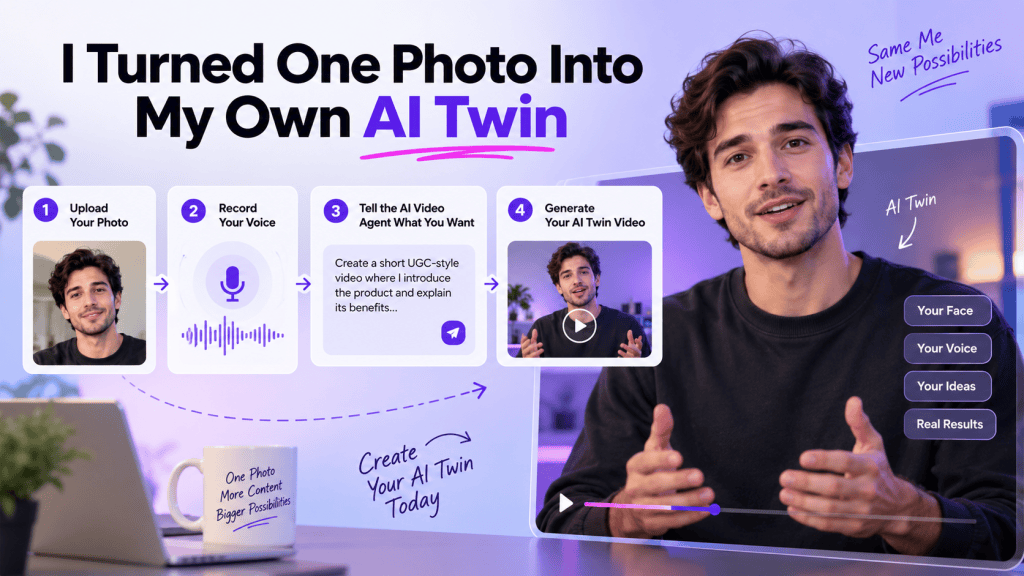
What if you could turn a single photo of yourself into a digital version of you that can actually appear in videos?
That was exactly what I wanted to test.
Instead of hiring a creator, setting up a camera, recording multiple takes, worrying about lighting, or spending hours editing a video, I decided to try an AI twin generator. The goal was simple: take one photo and my own voice and turn them into a video featuring an AI version of me.
The process was surprisingly straightforward.
I uploaded my photo, recorded my voice, and then handed the rest of the work to an AI Video Agent. Rather than manually creating a script, selecting complicated settings, or learning video-editing software, I simply told the agent what kind of video I wanted.
A few steps later, I had an AI twin video.
In this guide, I’ll walk through exactly how the process worked, what an AI twin actually is, what surprised me, where the technology works best, and whether an AI twin generator is worth using for content creation and marketing.
What Is an AI Twin?
An AI twin is an AI-generated digital version of a person that can be used to create videos without requiring that person to physically record every video.
Depending on the platform, an AI twin can reproduce elements such as your appearance, facial movements, expressions, voice, and delivery.
The idea is particularly interesting for people who create content regularly.
Imagine needing to create:
- Product advertisements
- Social media videos
- UGC-style ads
- TikTok videos
- Instagram Reels
- YouTube Shorts
- Product explainers
- Educational videos
- Personal-brand content
Normally, every video requires some combination of recording, retakes, editing, lighting, scripting, and post-production.
With an AI twin generator, you can create a reusable digital version of yourself and use it as the presenter for future videos.
That doesn’t mean the AI completely replaces your creative input. Instead, it removes much of the repetitive production work.
Why I Wanted to Try an AI Twin Generator
I’ve used AI tools that generate images and videos before, but creating a digital version of myself felt different.
The main question I had was:
Can one photo really be enough to create a convincing AI version of me?
I also wanted to know how much work would be required.
Would I need to upload dozens of photographs?
Would I have to film myself for several minutes?
Would I need to write a complicated prompt?
Or would the entire process actually be simple enough for someone without video-production experience?
For this experiment, I used a simple workflow:
Upload my photo → Record my voice → Tell the AI Video Agent what I want → Generate the video.
That simplicity is what makes the concept interesting.
How I Created My AI Twin Video
Step 1: Upload Your Photo
The first step was uploading a photo of myself.
This is where the process begins. Instead of filming myself in front of a camera, I used a single image as the visual starting point for my AI twin.
For the best results, your photo should clearly show your face. A front-facing or relatively straightforward portrait works better than a heavily angled image, blurry photograph, or image where your face is partially hidden.
A good source photo should ideally have:
- Clear facial visibility
- Good image quality
- Reasonable lighting
- A natural facial expression
- Minimal obstruction around the face
The goal is to give the AI enough visual information to understand what you look like.
Once the image was uploaded, the platform could use it as the visual identity for the AI twin.
And this is where the process started getting interesting.
Instead of thinking about the uploaded photo as just an image, I was essentially giving the AI a visual representation that could be used inside a video.
Step 2: Record Your Voice
The next step was recording my voice.
This is an important part of creating an AI twin because appearance is only one part of the experience.
If the video looks like you but sounds completely different, the result won’t feel much like your digital twin.
So I recorded my voice for the AI to use when generating the video.
The voice recording provides the audio identity for the twin, while the photo provides the visual identity.
Together, these two inputs create the foundation:
Your photo + Your voice = Your AI twin identity.
This is also one of the reasons an AI twin can be useful for personal-brand content.
Instead of using a generic AI avatar, you can create videos around your own appearance and voice.
Step 3: Let the AI Video Agent Take Over
After uploading my photo and recording my voice, the next step was where the workflow became much easier.
The platform takes me into its AI Video Agent.
Instead of manually configuring every part of the video, I could simply tell the agent what kind of video I wanted.
This changes the experience considerably.
Traditional AI video tools can sometimes feel like operating a complicated editor. You may need to choose an avatar, enter a script, select a background, adjust scenes, select animations, configure timing, and make several other decisions.
An AI Video Agent takes a more conversational approach.
I could describe the video I wanted rather than figuring out every production setting myself.
For example, I could ask for a short product advertisement featuring my AI twin, explain what the product does, describe the tone, and specify the type of content I wanted.
The agent then handles the video-generation workflow.
Step 4: Tell the AI What Video You Want
This was probably my favorite part of the process.
Instead of starting with a blank video timeline, I could simply describe my idea.
For example:
Create a short UGC-style product video where my AI twin introduces the product, explains its main benefit, and ends with a strong call to action.
That’s essentially the creative direction.
You don’t necessarily have to think like a professional video editor.
You can think like a content creator.
Tell the AI:
- What the video is about
- Who the audience is
- What tone you want
- What message you want to communicate
- How long you want the video to be
- What action viewers should take
The AI Video Agent can then turn that direction into the video-generation workflow.
This is particularly useful for marketers because the difficult part isn’t always creating the video itself.
Sometimes the difficult part is translating an idea into a production-ready video.
An AI agent helps bridge that gap.
Step 5: Generate Your AI Twin Video
Once I had provided the instructions, the final step was generating the video.
The system used the uploaded photo and recorded voice as the foundation for my AI twin and created the requested video.
And this was the moment I was waiting for.
Instead of sitting in front of a camera, recording myself delivering the script, and editing the footage afterward, I had effectively created a video featuring a digital version of myself.
The biggest difference was the production process.
The traditional workflow might look like:
Idea → Script → Camera setup → Recording → Retakes → Editing → Captions → Export
The AI twin workflow was closer to:
Photo → Voice → Video idea → AI Video Agent → AI twin video
That reduction in production steps is where an AI twin generator can become especially useful.
What Can You Use an AI Twin For?
Creating a digital version of yourself is fun, but the technology becomes much more useful when you start thinking about practical applications.
1. Social Media Content
If you’re constantly creating content for TikTok, Instagram, YouTube Shorts, or other social platforms, an AI twin can help you produce presenter-style videos without recording yourself every time.
You can create different variations around the same topic and experiment with different hooks.
2. UGC-Style Ads
One of the most interesting applications is UGC-style advertising.
Brands need a constant stream of creative variations to test different hooks, messaging, products, and calls to action.
An AI twin can become the recurring presenter for those videos.
You could create a product introduction, testimonial-style concept, problem/solution video, or promotional video using your digital identity.
3. Product Demonstrations
If you’re building a personal brand or selling a product, your AI twin can act as a presenter.
For example, you could create a video explaining:
- What your product does
- How it works
- Why someone should use it
- Its key features
- Common customer questions
Instead of recording each explanation manually, you can generate different versions.
4. Educational Videos
Creators, coaches, consultants, and educators can use AI twins to produce instructional content.
You could create a series of short videos explaining different concepts while maintaining a consistent presenter.
5. Personal Branding
This may be one of the most compelling use cases.
Your face and voice are important parts of your personal brand.
An AI twin allows you to maintain that identity while making video creation more scalable.
You can spend more time developing ideas and less time repeatedly appearing in front of a camera.
AI Twin Generator vs. Traditional Video Creation
The biggest advantage isn’t necessarily that an AI twin creates a “perfect” video.
The advantage is speed and scalability.
Consider a creator who wants to publish five videos every week.
With traditional production, that might mean five separate recording sessions, multiple takes, editing, and exporting.
With an AI twin generator, the creator can potentially generate multiple video concepts from the same digital identity.
That makes experimentation easier.
You can test different:
- Hooks
- Scripts
- Offers
- Video lengths
- Calls to action
- Messaging styles
For marketers, this is particularly valuable because successful advertising often depends on testing many creative variations.
What Surprised Me About the Process
The biggest surprise wasn’t simply seeing an AI version of myself.
It was how little technical work was required.
I expected the process to involve complicated settings and a lot of experimentation.
Instead, the workflow was relatively simple:
1. Upload your photo.
2. Record your voice.
3. Enter the AI Video Agent.
4. Tell it what kind of video you want.
5. Generate your AI twin video.
That makes the technology accessible to people who aren’t professional video editors.
You don’t need to understand keyframes, timelines, transitions, or complex animation settings to get started.
The creative direction can remain the focus.
How to Get Better Results From an AI Twin Generator
Although the workflow is simple, the quality of your input still matters.
Use a Clear Photo
Start with a high-quality image where your face is easy to see.
Avoid extremely dark photos, blurry selfies, sunglasses, or images where your face is covered.
Record Clear Audio
Your voice recording is another important input.
Record somewhere relatively quiet and speak naturally. Clear audio gives the system a better foundation for creating your AI voice.
Give the AI Agent Specific Instructions
Instead of saying:
Make a video about my product.
Give the agent more context.
For example:
Create a 30-second UGC-style video introducing this product. Start with a strong hook about the problem it solves, explain the main benefit in a conversational tone, and finish with a clear call to action.
Specific instructions give the AI more creative direction.
Experiment With Different Concepts
Don’t stop after creating one video.
One of the biggest advantages of AI video generation is the ability to experiment.
Try different hooks.
Try different tones.
Try different audiences.
Try shorter and longer versions.
Your first video doesn’t have to be your final video.
Is an AI Twin Generator Worth It?
After trying the workflow, I think the answer depends on how often you create video content.
If you only make one video every few months, an AI twin may simply be an interesting experiment.
But if you’re a creator, marketer, entrepreneur, agency, or business that needs regular video content, the value becomes much clearer.
The biggest benefit isn’t just avoiding the camera.
It’s creating a reusable digital presenter.
Once your AI twin is established, you can use that identity as the foundation for future video concepts.
That means your photo and voice don’t have to be one-off inputs.
They can become part of an ongoing content-production workflow.
Final Thoughts: My AI Twin Experiment
Turning one photo into an AI twin sounded futuristic when I started this experiment.
But the actual process was surprisingly straightforward.
I didn’t need a camera setup.
I didn’t need to record an entire video.
I didn’t need to learn professional editing software.
I simply uploaded my photo, recorded my voice, entered the AI Video Agent, described the video I wanted, and generated the result.
That is what makes an AI twin generator interesting.
It isn’t just about creating a digital copy of yourself.
It’s about changing how video content gets produced.
Instead of treating every video as a separate recording session, you can create a reusable AI version of yourself and use it to explore more ideas, produce more content, and test more creative concepts.
For anyone who creates videos regularly, that can be a significant shift.
The future of video creation may not require you to be in front of the camera every time.
Sometimes, you may only need one good photo, your voice, and a good idea.
 AI Avatar Tech Blog
Leave a comment