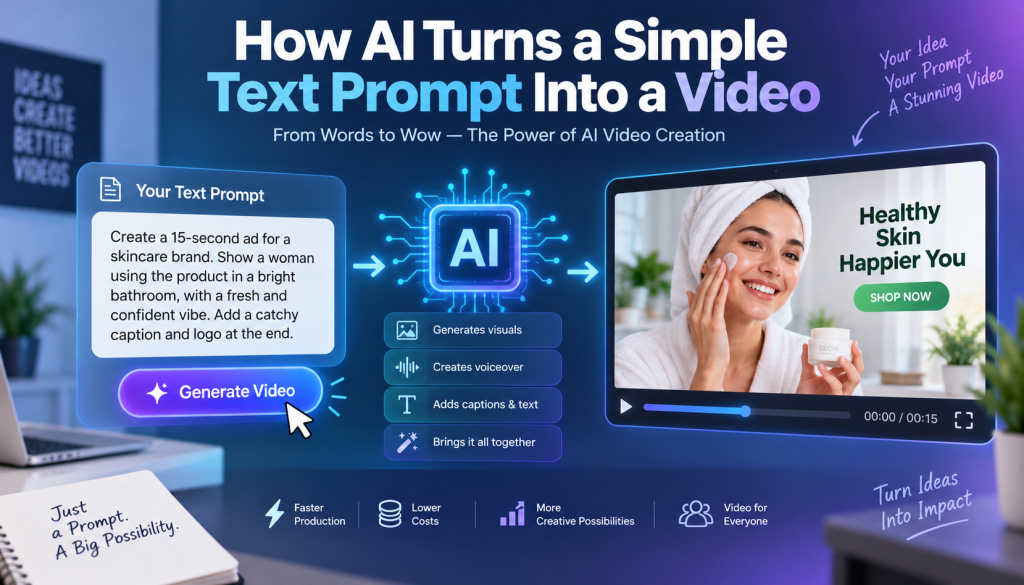
Creating a video used to require cameras, actors, scripts, lighting, editing software, and hours of production work. Today, artificial intelligence has changed that process completely. With an AI text to video ads generator, you can turn a simple written prompt into a complete video concept in minutes.
Instead of planning every shot manually, you can describe what you want to see, and AI can transform your instructions into scenes, visuals, voiceovers, animations, captions, and even advertising creatives.
For marketers, creators, ecommerce brands, and small businesses, this makes video production much faster and more accessible.
But how does it actually work?
How can a few sentences become a finished video?
In this guide, we’ll explain how AI turns text prompts into videos, what happens behind the scenes, how to write better prompts, and how businesses can use AI text-to-video technology to create effective ads.
What Is an AI Text to Video Generator?
An AI text to video generator is a software tool that uses artificial intelligence to create video content from written instructions.
Instead of recording a video yourself, you provide a description such as:
“Create a 20-second social media ad for a skincare product. Show a woman applying the product in a bright bathroom, followed by a close-up of the product and a short call to action.”
The AI interprets the prompt and generates video content based on the instructions.
Depending on the platform, the output may include:
- AI-generated video scenes
- Product visuals
- AI avatars
- Voiceovers
- Background music
- Captions
- Transitions
- Animations
- Camera movements
- Text overlays
- Calls to action
The exact features vary between platforms, but the basic idea is simple: describe the video you want, and AI helps create it.
This is particularly useful for advertising because marketers can test different concepts without producing every version manually.
How Does AI Turn Text Into Video?
The process may look simple from the user’s perspective, but several AI technologies work behind the scenes.
Here’s a simplified breakdown of what happens after you enter a prompt.
1. AI Understands Your Text Prompt
The first step is understanding what you’ve written.
When you enter a prompt, the AI analyzes the words and identifies important information such as:
- Subject
- Action
- Location
- Visual style
- Mood
- Duration
- Audience
- Product
- Camera direction
- Voiceover requirements
- Advertising message
For example, consider this prompt:
“Create a short ad for a fitness app showing a young professional exercising at home before work. Use energetic visuals and end with a sign-up call to action.”
The AI can identify the main subject, environment, action, tone, and objective.
It then uses this information to determine what the video should look and feel like.
2. AI Converts the Prompt Into a Video Plan
Before generating the final visuals, many AI systems effectively break the prompt into smaller elements.
For an advertisement, the system might interpret the request as:
Scene 1: Person preparing for a workout.
Scene 2: Person exercising at home.
Scene 3: Close-up of the app on a smartphone.
Scene 4: Product benefit or promotional message.
Scene 5: Call to action.
This allows the AI to turn one general instruction into a sequence of visual moments.
Some platforms give users control over individual scenes, while others automatically create the entire sequence.
3. AI Generates the Visuals
This is where generative AI becomes particularly powerful.
AI video models can generate or transform visual content based on the instructions they receive.
Depending on the tool, the system may create:
- People
- Products
- Environments
- Objects
- Backgrounds
- Animations
- Cinematic shots
- Camera movements
The AI predicts what visual information should appear in each frame and generates a sequence that matches the prompt.
For example, if you request a product being placed on a modern desk, the model attempts to create the desk, product placement, lighting, composition, and movement described in the prompt.
The result is a video rather than a single static image.
4. AI Adds Motion
A video needs movement.
After understanding the visual concept, AI can generate motion between frames.
This can include:
- Camera movement
- Object movement
- Facial movement
- Hand gestures
- Walking
- Product interactions
- Environmental movement
- Zooms and pans
This is one reason AI-generated video can feel very different from simply placing images into a slideshow.
The system attempts to create continuous visual movement that matches the requested action.
5. AI Generates Voiceovers
For advertising, visuals are only one part of the experience.
Many AI video platforms can also generate voiceovers from text.
For example, your prompt or script might include:
“Looking for a faster way to create professional videos? Try our AI video platform today.”
The AI converts the written script into spoken audio using an AI-generated voice.
Depending on the platform, you may be able to choose:
- Voice type
- Gender
- Accent
- Language
- Speaking speed
- Tone
- Emotion
This means you don’t necessarily need to hire a voice actor or record the voiceover yourself.
6. AI Synchronizes Audio and Visuals
The next step is combining the generated elements.
The system can synchronize:
- Voiceover
- Video scenes
- Music
- Captions
- Product shots
- Text overlays
For example, when the voiceover mentions a product benefit, the corresponding product visual may appear on screen.
This helps turn individual AI-generated components into a coherent advertisement.
7. AI Adds Captions and Text
Social media users frequently watch videos without sound, so captions are important.
Many AI video tools can automatically generate captions based on the voiceover.
They may also add advertising text such as:
“Save Time”
“Create Videos Faster”
“Try It Today”
“Get Started Now”
This makes the final video more suitable for platforms where short-form visual content is important.
What Is an AI Text to Video Ads Generator?
An AI text to video ads generator is specifically designed to turn written ideas, scripts, or product descriptions into advertising videos.
While a general AI video generator can create many types of content, an AI advertising generator focuses on marketing objectives.
For example, you might provide:
- Product description
- Website URL
- Advertising message
- Target audience
- Product image
- Short script
The AI can then create an advertisement around that information.
Some tools can generate multiple versions of the same ad with different:
- Hooks
- Scripts
- Visual styles
- Calls to action
- Backgrounds
- Presenters
- Product placements
This can be particularly useful for marketers running creative tests.
How to Write a Good Text Prompt for AI Video
The quality of your prompt can have a major impact on the result.
A vague prompt might produce a generic video.
A detailed prompt gives the AI more information about what you want.
Instead of writing:
“Make an ad for shoes.”
Try:
“Create a 20-second energetic social media ad for running shoes. Show a runner putting on the shoes, running through a city park at sunrise, and finishing with a close-up of the shoes. Use fast-paced cinematic shots, energetic music, bold captions, and end with the CTA ‘Shop Now.’”
The second prompt provides significantly more direction.
Include the Product
Tell the AI exactly what you’re promoting.
For example:
“Create an advertisement for a wireless noise-canceling headphone.”
Describe the Audience
Specify who the video is intended for.
For example:
“Target busy professionals who work remotely.”
This can influence the tone and visual storytelling.
Explain the Scene
Describe where the video should take place.
For example:
“Show the customer using the product in a modern home office.”
Add the Desired Style
You can describe the creative direction.
Examples include:
- Cinematic
- Minimalist
- Professional
- UGC-style
- Energetic
- Luxury
- Playful
- Documentary
- Social media style
Include the Call to Action
Tell the AI how the advertisement should end.
Examples:
- Shop Now
- Learn More
- Try It Free
- Sign Up Today
- Download Now
- Get Started
AI Text to Video for Advertising
Advertising is one of the most practical applications of text-to-video AI.
Traditional ad production can require several people and multiple stages.
You may need:
- Concept development
- Scriptwriting
- Casting
- Filming
- Editing
- Voiceover
- Graphics
- Review
- Revisions
An AI text to video ads generator can simplify many of these steps.
You can start with an idea and quickly turn it into a video concept.
For example:
Prompt:
“Create a 15-second social media ad for a meal delivery service. Show a busy professional receiving a fresh meal after work. Highlight convenience and end with ‘Dinner Made Easy.’”
The AI can use that description to develop a short advertising video.
This doesn’t mean every generated video will be perfect on the first attempt. You may still need to revise the prompt, adjust scenes, replace visuals, or edit the final result.
However, AI can dramatically shorten the time between idea and first draft.
Benefits of Using an AI Text to Video Ads Generator
Faster Video Production
The biggest advantage is speed.
Instead of starting every video from scratch, marketers can generate an initial version from a prompt.
Lower Production Costs
AI can reduce the need for some traditional production resources, especially for simple social media creatives and product videos.
More Creative Testing
Advertising success often depends on testing different creative concepts.
AI makes it easier to generate multiple variations.
You can test different hooks, messaging, visuals, and calls to action.
Easier Content Creation for Small Businesses
Small businesses may not have access to a full video production team.
AI gives them another way to create marketing content without investing heavily in traditional production.
Personalized Advertising
AI can help generate different versions of content for different audiences.
For example, the same product could have one ad designed for students, another for professionals, and another for parents.
AI Text to Video vs. Traditional Video Production
Traditional video production still offers major advantages, particularly when you need real people, physical products, complex storytelling, or highly controlled brand visuals.
However, AI video generation is useful when speed and experimentation are priorities.
| Feature | Traditional Video | AI Text to Video |
| Production speed | Usually slower | Usually faster |
| Camera required | Often | No |
| Actors required | Often | Not always |
| Editing required | Yes | Often automated |
| Creative testing | More expensive | Easier |
| Customization | High | Increasing rapidly |
| Production cost | Can be high | Often lower |
| Scalability | Limited by production resources | Highly scalable |
The best choice depends on your campaign.
Many businesses may ultimately use a combination of traditional and AI-generated video rather than relying exclusively on one approach.
Common Mistakes When Using AI Video Generators
AI video generation is powerful, but users can make mistakes.
Using Extremely Vague Prompts
A prompt like “make a good advertisement” gives the AI very little direction.
Be specific about the product, audience, scene, style, and objective.
Trying to Include Too Much Information
The opposite problem can also happen.
If your prompt contains too many unrelated ideas, the AI may struggle to create a coherent video.
Focus on one clear concept.
Ignoring the First Few Seconds
For social media advertising, the opening matters.
Start with a strong hook that gives viewers a reason to continue watching.
Forgetting the CTA
An advertisement should generally have a clear next step.
Tell viewers what you want them to do.
Publishing Without Reviewing
Always review AI-generated videos before publishing.
Check:
- Product appearance
- Text accuracy
- Voice pronunciation
- Brand information
- Visual consistency
- Claims
- Captions
- Call to action
AI-generated content can contain errors, so human review remains important.
Tips for Creating Better AI Video Ads
If you want stronger results from an AI text to video ads generator, follow these practices.
Start With the Hook
Begin your prompt by explaining the attention-grabbing idea.
For example:
“Open with a frustrated customer struggling with a common problem.”
Keep the Story Simple
Short advertisements usually work better when they communicate one central idea.
A basic structure can be:
Problem → Solution → Benefit → CTA
Use Short Scripts
Avoid forcing too much information into a short video.
A concise message is easier to understand and easier for AI to present naturally.
Create Multiple Versions
Don’t stop after generating one video.
Create different versions with alternative hooks, visuals, and CTAs.
Then compare their performance.
Maintain Brand Consistency
Use consistent brand messaging, visual identity, product information, and tone across your AI-generated ads.
The Future of Text-to-Video Advertising
AI video generation is evolving quickly.
Future AI video systems are likely to provide greater control over characters, products, camera movements, environments, dialogue, and storytelling.
The workflow may become increasingly simple:
Idea → Prompt → AI Video → Edit → Publish
Instead of spending hours learning complex video editing software, marketers may be able to focus primarily on creative strategy.
AI could also make advertising more personalized.
A brand might generate different advertisements based on a viewer’s language, location, interests, or stage in the buying journey.
This could make video advertising more adaptable and scalable.
However, human creativity will remain important.
AI can generate content, but marketers still need to decide what story to tell, who to target, what problem to solve, and why someone should care.
Frequently Asked Questions About AI Text to Video
Can AI really create a video from just text?
Yes. Modern AI video generators can create video content from written prompts. Depending on the platform, they may generate visuals, animations, voiceovers, captions, and other elements.
What is the best AI text to video ads generator?
The best tool depends on your requirements. Consider video quality, advertising features, customization, avatar support, voice options, editing capabilities, pricing, and commercial usage rights before choosing a platform.
Can I create ads without filming myself?
Yes. Many AI video platforms allow you to create advertisements without recording yourself. You can use AI-generated visuals, avatars, voiceovers, or product assets instead.
Are AI-generated video ads good for social media?
They can be. AI-generated videos can be useful for creating short-form advertisements and testing multiple creative concepts. However, quality depends on the platform, prompt, assets, and amount of editing.
Do I need video editing skills?
Not necessarily. Many AI video platforms automate much of the production process. Basic editing knowledge can still be helpful when you want more control over the final advertisement.
Final Thoughts
An AI text to video ads generator changes the traditional video production process by allowing marketers to start with words instead of cameras.
You describe the product, audience, story, visuals, tone, and call to action. AI then interprets that information, generates scenes, creates motion, produces voiceovers, adds captions, and combines everything into a video.
The biggest advantage isn’t simply that AI can create videos. It’s that AI can make the creative process faster and easier to repeat.
Instead of spending days producing one advertising concept, marketers can experiment with multiple ideas, quickly create variations, and focus more attention on finding the message that connects with their audience.
The technology isn’t a replacement for creative strategy or human review. The best results come when people use AI as a production partner—providing strong ideas, clear prompts, accurate product information, and thoughtful creative direction.
The workflow is becoming remarkably simple:
Write your idea → Describe your video → Generate → Review → Edit → Publish.
For businesses looking to produce more advertising content with fewer production barriers, text-to-video AI could become one of the most useful tools in the modern marketing workflow.


Leave a Reply